
Building White-Label AI Voice Agent: A Complete Guide
 Published On March 11th, 2026
AI voice agents are assisting with our daily activities. It schedules appointments, resolves customer queries, and guides drivers in navigation. It’s found in smart home devices to help automate routine tasks.
Besides this, for BPO companies, call centers, and helpdesk services, the AI agent delivers a human-like voice experience. And creating white-label AI voice software is possible without coding.
In this article, you will learn how to create your own AI voice assistant with your brand logo and colour theme. Let’s get started.
Table of Contents
What Is an AI Voice Agent?
An AI-powered voice agent is a software system that interacts in real-time with humans. Unlike traditional IVRs, modern voice agents use technologies such as Natural Language Processing, Large Language Models, and Automatic Speech Recognition. It understands the intent and context of spoken language and takes actions.
Why Businesses Need a Voice AI Agent?
Imagine this: You need an AI assistant that supports customers in multiple languages to scale the business. It should be available 24 hours a day and deliver personalized answers. You want all these at a minimal operating cost.
And that’s exactly why an AI voice assistant is required for your business. Here are 4 solid points:
Routine Task Automation: Voice agents are handling high-volume calls and answering customer queries. Businesses can scale as AI agents automate repetitive tasks.
Human-like Customer Experience: It uses CRM data, contextual memory, and caller history to deliver a personalized response.
Customer Data Collection: The agent collects structured and unstructured customer conversations from transcripts. These help businesses to refine strategies.
Instant Response Anytime: IVR wait time and call queue are eliminated. Therefore, businesses never miss inbound calls.
How To Choose the Right AI Voice Agent Solution
Most of the voice agent platforms promise to handle customer requests accurately and personalize the tone. But what matters is that the conversational AI agent you build should feel 100% yours. It should offer complete data ownership. Choose a platform that offers:
Self-Hosting Option. The voice agent should be flexibly deployed on cloud or on-premise infrastructure. This ensures full control over your customer data, performance, and security.
Customizable Solution. You should personalize how the voice agents look, sound, and behave. Build it the way to match your exact needs, not the vendor’s template.
White Label AI Voice Agent. It should allow launching the voice solution under your own product identity. (using your own agent name, logo, or colour)
Here are the key features to evaluate the best conversational AI agent for enterprises.
RAG-driven Agents: This enables retrieval augmented generation to connect the agent with live business data. It pulls answers from your knowledge base, CRM, or documentation to improve accuracy.
Latency <500ms: The low latency ensures human-level interruption and real-time dialogue. This is critical for customer support and outbound sales calls.
AI Moderation: The voice agent should detect sensitive content. It’s important to protect brand reputation during live customer conversations.
Custom LLMs: The custom AI LLM models are essential for providing industry-specific and human-like interactions. It supports dynamic conversation specific to business needs.
100+ Third-Party Integrations: Conversational AI must integrate with any platforms. (Example: CRMs, help desks, or other). This flexibility guarantees operational efficiency.
Security & Compliance: The voice platform must support end-to-end encryption. Look if it is compliant with regulated industries and follows GDPR, HIPAA, and SOC 2.
Understanding How It Works Before We Start to Build
The working process of the AI virtual assistant includes three major components. Speech-to-text (STT), Natural Language Understanding (NLU), and Text-to-Speech (TTS).
STT: The agent captures the voice and converts it into text in real-time.
NLU: This engine processes the text, analyzes the user intent, and sentiment. It utilizes LLMs to understand unstructured language.
TTS: The agent generates a relevant response and converts it into natural-sounding audio.
Build Your White Label AI Voice Agent: 7 Easy Steps
To build and integrate the AI voice agents to the web, we will use the MirrorFly RAG dashboard and its SDK. This solution supports real-time audio streaming, a knowledge base, and a voice flow builder.
Step 1: Log In To MirrorFly
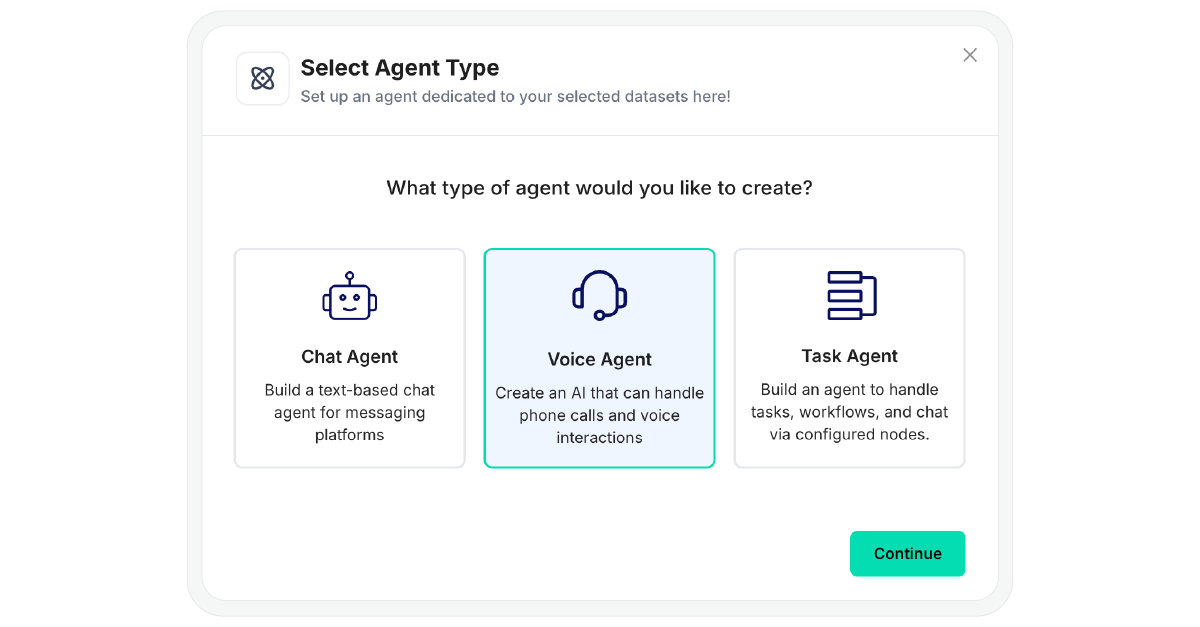
First, contact the MirrorFly sales team to get the account credentials and log in to the dashboard. Click ‘Create Agent‘ and then select ‘Voice Agent‘.
Step 2: Configuring The AI Voice Software
In this step, you have to set the speech and model behavior settings.
Speech Setting: Adjust the interruption sensitivity. This controls how easily the voice agent can be interrupted in live conversations.
Select a STT provider from the drop-down menu. Either Deepgram, ElevenLabs, or a custom model. Deepgram delivers low-latency STT and TTS. Whereas ElevenLabs specializes in voice cloning technology.
Choose one TTS provider from the drop-down menu that includes Deepgram, ElevenLabs, Coqui, Kokoro, or a custom model. Coqui is best suited if you need extensive customization. Kokoro offers high-quality voice and runs on minimal hardware.
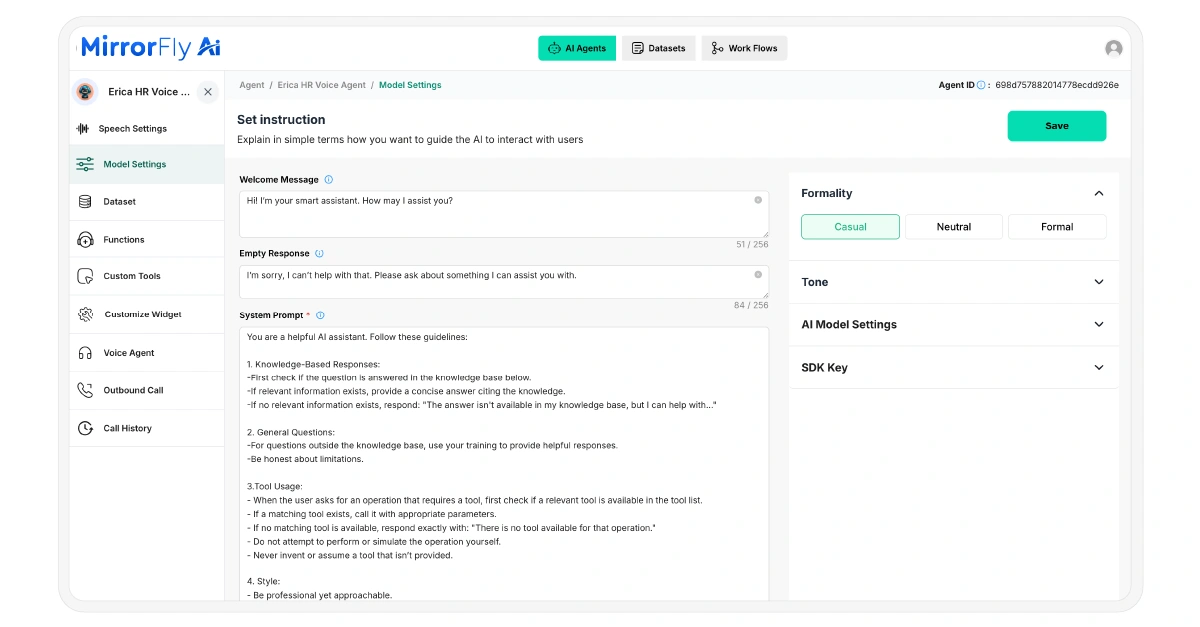
AI Model Settings: Set “welcome message” when an AI voice chat begins. For empty or unclear user inputs, make sure to have a “fallback response”.
Select one AI model for reasoning. It can be either GPT-3.5 Turbo, GPT-4.5 Turbo, or GPT-4o mini. Here, each model has its own complexity and limitations.
Set the “system prompt” to define the AI call assistant’s behavior or role boundaries. Sample prompt for your reference:
System Prompt:
1. Knowledge-Base Responses:
Check if the customer query is answered in the knowledge base. If relevant information exists, provide an answer referring to it. If no relevant information exists, respond: “The answer isn’t available in my knowledge base.
Always be honest about limitations.
2. Third Party Tool:
When the user asks for an operation that needs a tool, check if a relevant tool is available in the integrated list. If a matching tool exists, call it with appropriate parameters.
If no matching tool is available, respond as: “There is no tool available for that operation.” Never invent or assume a tool that isn’t provided.
3. Style:
Use a professional tone. Break down complex information. Offer follow-up suggestions when appropriate.
Step 3: RAG Implementation
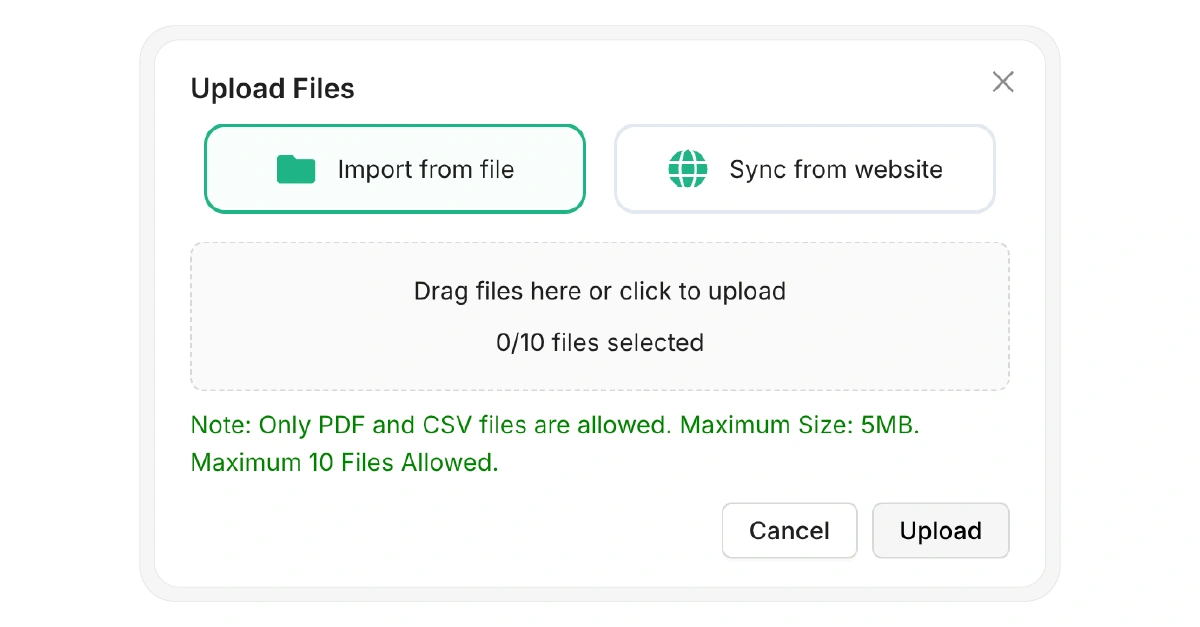
Now upload knowledge bases in either PDF or CSV format. The maximum file size is 5MB, and upload up to 10 files for a domain-specific AI voice assistant. Alternatively, your company website URL can be synced to retrieve information.
Step 4: Voice Flow Builder
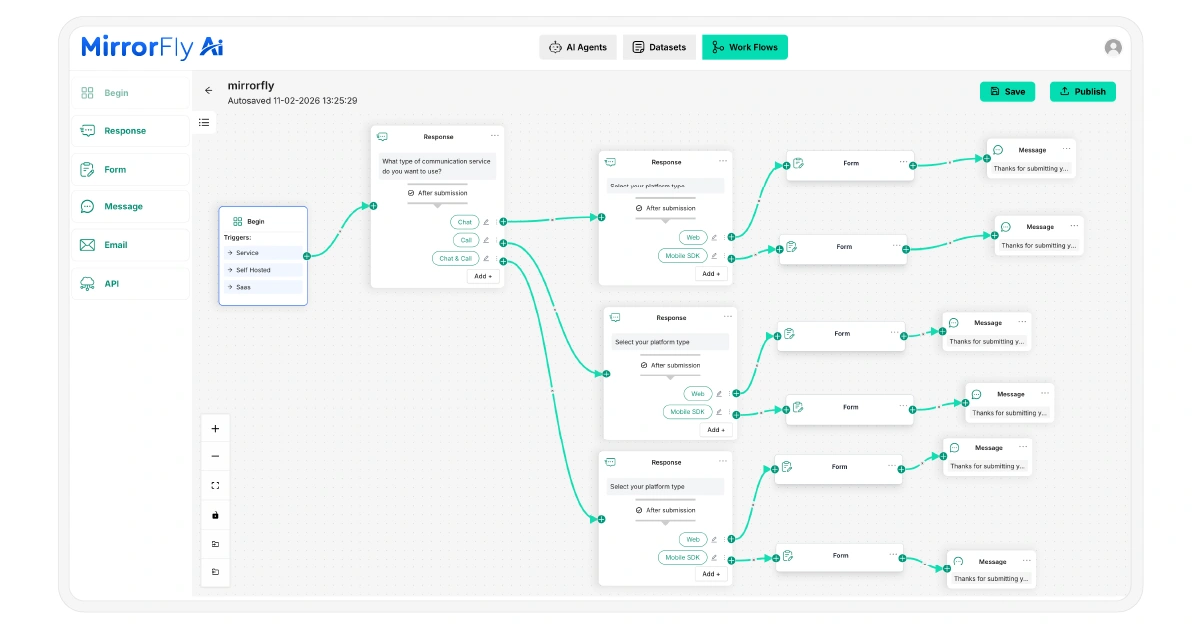
Here, the visual drag-and-drop canvas includes “begin, respond, connect API, email trigger, form, and message node”. Use them to define the logic path of the conversation. Once the voice flow building is completed, we can proceed to integrate custom tools.
Step 5: Integrate Custom Tools
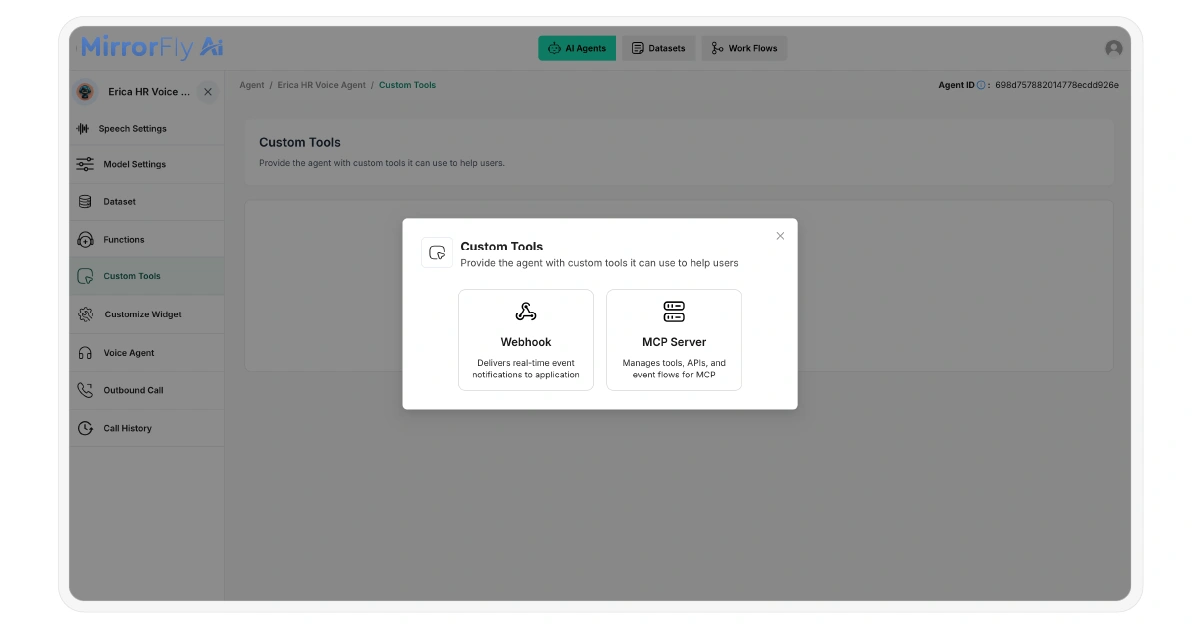
In this step, you have to integrate CRMs, calendar tools, messaging platforms, and custom webhooks into the voice agent. This enables the AI agent for real-time voice conversation with third-party tools.
To add custom webhooks, define the tool name and execution condition. Then, specify the HTTP method, URL, headers, path variables, and query parameters. This controls how requests are triggered and processed.
Besides, manage external tools, APIs, and events through MCP. For this, you have to set the server URL and assign a connection label. Finally, secure the integration using an access token.
Step 6: Inbound & Outbound Call Function
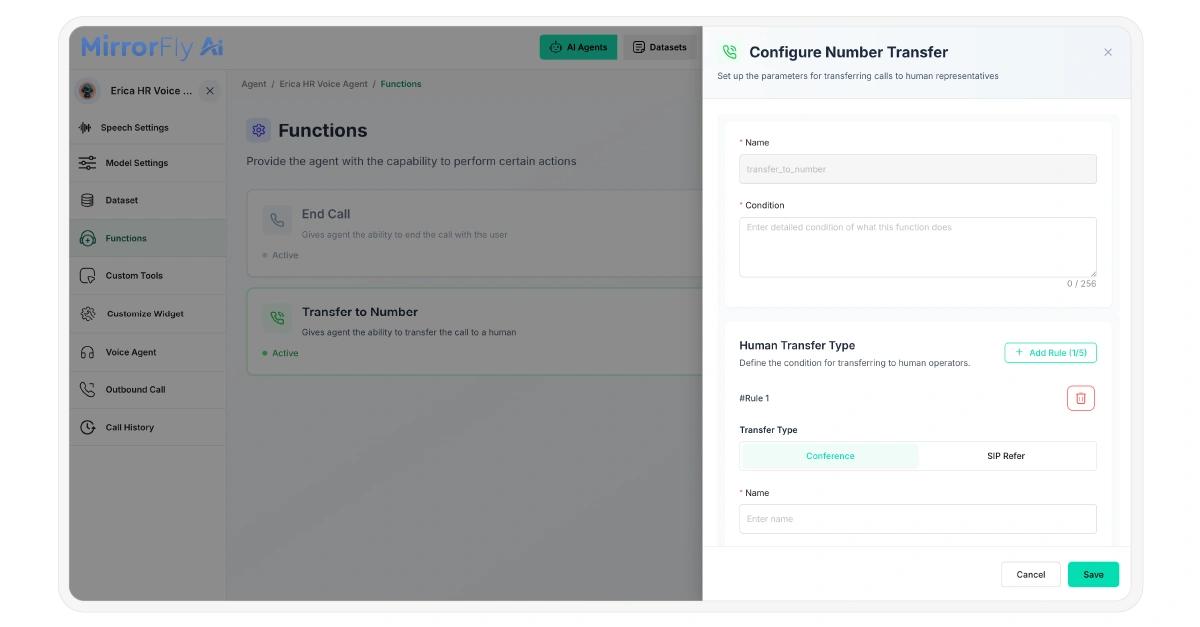
Now, set up the parameters for ending calls and transferring them to human agents. Configure the outbound call function either by initiating single or batch calls. Additionally, enable ‘Post-Call Analysis’ to extract insights and measure performance.
Step 7: Customize Widget
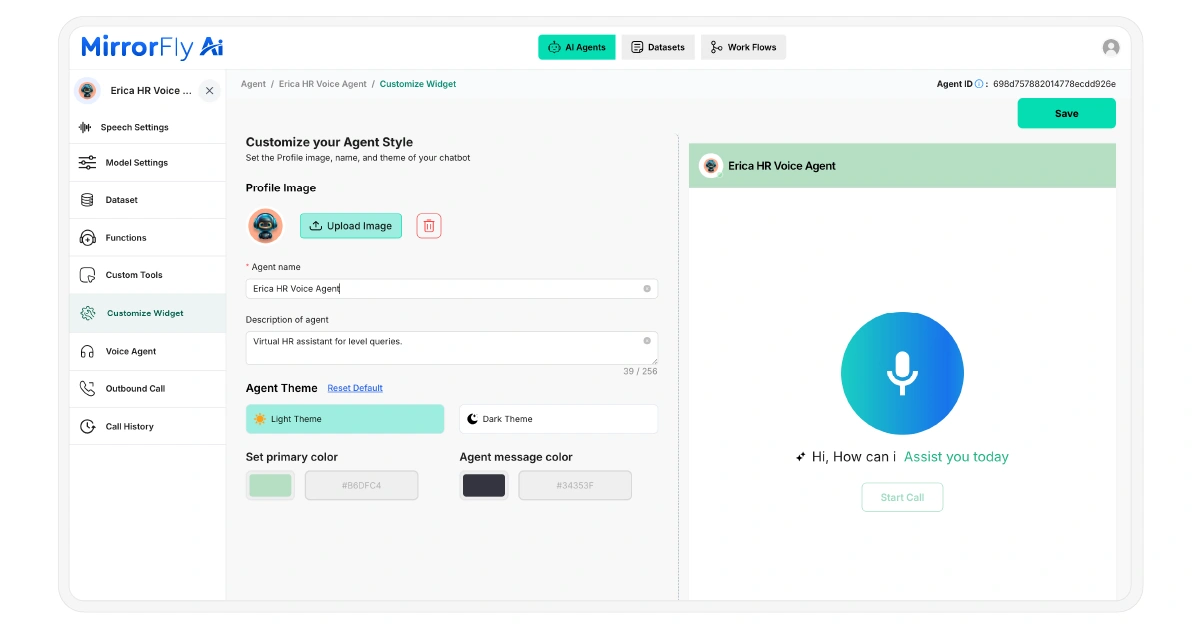
The white labelling capability allows you to fully customize the AI voice assistant for your business. Add a chatbot profile image, then set the light or dark theme, primary colour, and message colour. Preview the voice agent to check how it appears.
Deploying The Voice Agent
To deploy the AI voice assistant in web app, first install the SDK in your HTML file using the MirrorFly script tag.
Now the widget loads and initializes the SDK. The voice agent then establishes a connection with the backend server for authentication. The server returns a secure access token. Use that token to initialize the MirrorFly SDK and establish an authenticated session.
Finally, register event callbacks to listen for transcription, connection state, and SDK errors.
const callbacks = { onTranscription: (data) => console.log(“Transcription:”, data), onAgentConnectionState: (state) => console.log(“Connection:”, state), onError: (error) => console.error(“SDK Error:”, error) };Conclusion
The world of voice technology is rapidly changing. Scripted bots don’t help businesses grow at scale. Therefore, building a full-stack voice agent is a need of the hour. Especially for enterprises and growing businesses.
That being said, MirrorFly helps create an AI voice agent that handles complex workflows and analyzes customer sentiment. Not only that, it delivers real-time interactions with sub-second latency.
If you’re thinking of this conversational AI solution, contact their expert to build, test & launch your own white label voice agent in the next 24 hrs.


AI voice agents are assisting with our daily activities. It schedules appointments, resolves customer queries, and guides drivers in navigation. It’s found in smart home devices to help automate routine tasks.
Besides this, for BPO companies, call centers, and helpdesk services, the AI agent delivers a human-like voice experience. And creating white-label AI voice software is possible without coding.
In this article, you will learn how to create your own AI voice assistant with your brand logo and colour theme. Let’s get started.
Table of Contents
What Is an AI Voice Agent?
An AI-powered voice agent is a software system that interacts in real-time with humans. Unlike traditional IVRs, modern voice agents use technologies such as Natural Language Processing, Large Language Models, and Automatic Speech Recognition. It understands the intent and context of spoken language and takes actions.
Why Businesses Need a Voice AI Agent?
Imagine this: You need an AI assistant that supports customers in multiple languages to scale the business. It should be available 24 hours a day and deliver personalized answers. You want all these at a minimal operating cost.
And that’s exactly why an AI voice assistant is required for your business. Here are 4 solid points:
Routine Task Automation: Voice agents are handling high-volume calls and answering customer queries. Businesses can scale as AI agents automate repetitive tasks.
Human-like Customer Experience: It uses CRM data, contextual memory, and caller history to deliver a personalized response.
Customer Data Collection: The agent collects structured and unstructured customer conversations from transcripts. These help businesses to refine strategies.
Instant Response Anytime: IVR wait time and call queue are eliminated. Therefore, businesses never miss inbound calls.
How To Choose the Right AI Voice Agent Solution
Most of the voice agent platforms promise to handle customer requests accurately and personalize the tone. But what matters is that the conversational AI agent you build should feel 100% yours. It should offer complete data ownership. Choose a platform that offers:
Self-Hosting Option. The voice agent should be flexibly deployed on cloud or on-premise infrastructure. This ensures full control over your customer data, performance, and security.
Customizable Solution. You should personalize how the voice agents look, sound, and behave. Build it the way to match your exact needs, not the vendor’s template.
White Label AI Voice Agent. It should allow launching the voice solution under your own product identity. (using your own agent name, logo, or colour)
Here are the key features to evaluate the best conversational AI agent for enterprises.
RAG-driven Agents: This enables retrieval augmented generation to connect the agent with live business data. It pulls answers from your knowledge base, CRM, or documentation to improve accuracy.
Latency <500ms: The low latency ensures human-level interruption and real-time dialogue. This is critical for customer support and outbound sales calls.
AI Moderation: The voice agent should detect sensitive content. It’s important to protect brand reputation during live customer conversations.
Custom LLMs: The custom AI LLM models are essential for providing industry-specific and human-like interactions. It supports dynamic conversation specific to business needs.
100+ Third-Party Integrations: Conversational AI must integrate with any platforms. (Example: CRMs, help desks, or other). This flexibility guarantees operational efficiency.
Security & Compliance: The voice platform must support end-to-end encryption. Look if it is compliant with regulated industries and follows GDPR, HIPAA, and SOC 2.
Understanding How It Works Before We Start to Build
The working process of the AI virtual assistant includes three major components. Speech-to-text (STT), Natural Language Understanding (NLU), and Text-to-Speech (TTS).
STT: The agent captures the voice and converts it into text in real-time.
NLU: This engine processes the text, analyzes the user intent, and sentiment. It utilizes LLMs to understand unstructured language.
TTS: The agent generates a relevant response and converts it into natural-sounding audio.
Build Your White Label AI Voice Agent: 7 Easy Steps
To build and integrate the AI voice agents to the web, we will use the MirrorFly RAG dashboard and its SDK. This solution supports real-time audio streaming, a knowledge base, and a voice flow builder.
Step 1: Log In To MirrorFly
First, contact the MirrorFly sales team to get the account credentials and log in to the dashboard. Click ‘Create Agent‘ and then select ‘Voice Agent‘.
Step 2: Configuring The AI Voice Software
In this step, you have to set the speech and model behavior settings.
Speech Setting: Adjust the interruption sensitivity. This controls how easily the voice agent can be interrupted in live conversations.
Select a STT provider from the drop-down menu. Either Deepgram, ElevenLabs, or a custom model. Deepgram delivers low-latency STT and TTS. Whereas ElevenLabs specializes in voice cloning technology.
Choose one TTS provider from the drop-down menu that includes Deepgram, ElevenLabs, Coqui, Kokoro, or a custom model. Coqui is best suited if you need extensive customization. Kokoro offers high-quality voice and runs on minimal hardware.
AI Model Settings: Set “welcome message” when an AI voice chat begins. For empty or unclear user inputs, make sure to have a “fallback response”.
Select one AI model for reasoning. It can be either GPT-3.5 Turbo, GPT-4.5 Turbo, or GPT-4o mini. Here, each model has its own complexity and limitations.
Set the “system prompt” to define the AI call assistant’s behavior or role boundaries. Sample prompt for your reference:
System Prompt:
1. Knowledge-Base Responses:
Check if the customer query is answered in the knowledge base. If relevant information exists, provide an answer referring to it. If no relevant information exists, respond: “The answer isn’t available in my knowledge base.
Always be honest about limitations.
2. Third Party Tool:
When the user asks for an operation that needs a tool, check if a relevant tool is available in the integrated list. If a matching tool exists, call it with appropriate parameters.
If no matching tool is available, respond as: “There is no tool available for that operation.” Never invent or assume a tool that isn’t provided.
3. Style:
Use a professional tone. Break down complex information. Offer follow-up suggestions when appropriate.
Step 3: RAG Implementation
Now upload knowledge bases in either PDF or CSV format. The maximum file size is 5MB, and upload up to 10 files for a domain-specific AI voice assistant. Alternatively, your company website URL can be synced to retrieve information.
Step 4: Voice Flow Builder
Here, the visual drag-and-drop canvas includes “begin, respond, connect API, email trigger, form, and message node”. Use them to define the logic path of the conversation. Once the voice flow building is completed, we can proceed to integrate custom tools.
Step 5: Integrate Custom Tools
In this step, you have to integrate CRMs, calendar tools, messaging platforms, and custom webhooks into the voice agent. This enables the AI agent for real-time voice conversation with third-party tools.
To add custom webhooks, define the tool name and execution condition. Then, specify the HTTP method, URL, headers, path variables, and query parameters. This controls how requests are triggered and processed.
Besides, manage external tools, APIs, and events through MCP. For this, you have to set the server URL and assign a connection label. Finally, secure the integration using an access token.
Step 6: Inbound & Outbound Call Function
Now, set up the parameters for ending calls and transferring them to human agents. Configure the outbound call function either by initiating single or batch calls. Additionally, enable ‘Post-Call Analysis’ to extract insights and measure performance.
Step 7: Customize Widget
The white labelling capability allows you to fully customize the AI voice assistant for your business. Add a chatbot profile image, then set the light or dark theme, primary colour, and message colour. Preview the voice agent to check how it appears.
Deploying The Voice Agent
To deploy the AI voice assistant in web app, first install the SDK in your HTML file using the MirrorFly script tag.
Now the widget loads and initializes the SDK. The voice agent then establishes a connection with the backend server for authentication. The server returns a secure access token. Use that token to initialize the MirrorFly SDK and establish an authenticated session.
Finally, register event callbacks to listen for transcription, connection state, and SDK errors.
const callbacks = { onTranscription: (data) => console.log(“Transcription:”, data), onAgentConnectionState: (state) => console.log(“Connection:”, state), onError: (error) => console.error(“SDK Error:”, error) };Conclusion
The world of voice technology is rapidly changing. Scripted bots don’t help businesses grow at scale. Therefore, building a full-stack voice agent is a need of the hour. Especially for enterprises and growing businesses.
That being said, MirrorFly helps create an AI voice agent that handles complex workflows and analyzes customer sentiment. Not only that, it delivers real-time interactions with sub-second latency.
If you’re thinking of this conversational AI solution, contact their expert to build, test & launch your own white label voice agent in the next 24 hrs.