I Tested The AI Chatbot Software For Website In 2026: Here’s The Top 10
 Published On February 27th, 2026
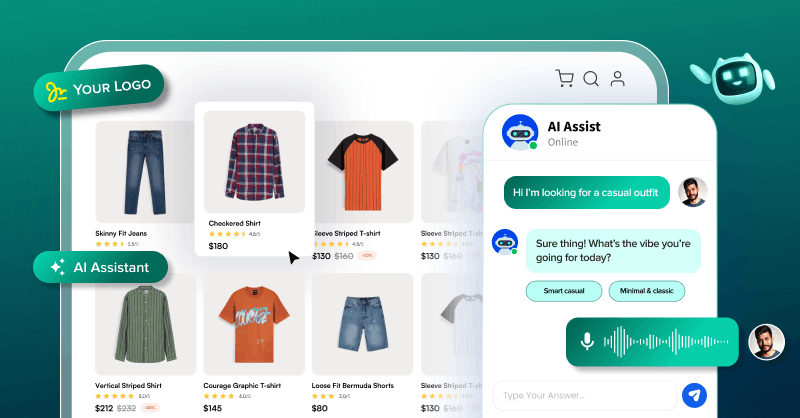
I spent months testing chatbot software across multiple use cases and reviewing G2 feedback. Here are the top 10 AI chat software that I used for my business in 2026.
Table of Contents
What Top Features I Looked In A Chatbot Software?
I didn’t look for the platform with the most features. I evaluated it from a business owner’s perspective. Here’s the criteria I used to find out which ones were the real deal.
- Is It Fully Customizable? I checked if I can build a chatbot that aligns precisely with my brand identity and business needs.
- Can I Self-host It Securely? My next step was to examine whether I can deploy the solution flexibly on my own private server or in a cloud server. The chatbot should also follow GDPR and HIPAA privacy rules to ensure security.
- Does It Support White Labelling? I verified if the AI-powered chatbot software supports customizing the brand logo and colors without any reference to the original provider.
- Is The Conversation Human-Like? From a practical standpoint, I wanted to know if the chatbots perform beyond keyword matching. It must support NLP, Generative AI, RAG, and intent recognition to ensure responses feel natural.
- Does It Support Multiple Languages? To find out if it provides consistent communication across regions, I reviewed whether the AI chat software could automatically identify users’ languages and respond.
- Can It Escalate to Live Agents? In a real-world use, the key question was whether it could hand off the conversation to a live agent. This must happen when it encounters a query exceeding its knowledge.
- Usability & Control? The focus here was on how easily the widget helped create a custom chatbot. With this control, even my non-technical teams built and launched the chatbot software.
- Third-Party Integrations & Data Ingestion? Beyond basic integrations with CRMs, helpdesks, and databases via APIs, I evaluated how internal data is ingested for RAG. Finally, I checked whether webhooks can automatically keep my knowledge base updated for accurate responses.
The Best AI Chat Software At A Glance
My picks as the top 10 AI chatbots for business in 2026 are Apphitect, MirrorFly, HubSpot, ManyChat, Intercom, Drift, Zendesk, Ada, Zapier, and LivePerson.
| Providers | For Whom | Standout Feature | Starting Price |
| Apphitect | Startups, small-to-medium businesses (SMBs), and enterprises | Fully Customizable AI Agent | Custom quote for enterprises |
| MirrorFly | Growing businesses, SMEs, developers & CTOs | Self-hosted conversational RAG chatbot | Offers a custom price |
| HubSpot | Small to mid-sized businesses prioritizing CRM integration | Breeze AI content generation | Free plan, paid plan starts at $20/month |
| ManyChat | Social media marketing automation company | Visual drag-and-drop builder | Free plan, Pro plan starts at $15/month |
| Intercom | Companies dealing with support tickets | AI-powered Fin assistant | 14-day free plan, essential plan starts at $39 per agent/month |
| Drift | Companies prioritizing sales and leads | Real-time lead qualification | The premium tier plan starts at $2500/month |
| Zendesk | Organizations with omnichannel customer service | Intelligent triage and routing | 14-day free trial, paid plan starts at $55 per agent/month |
| Ada | Non-tech teams automating customer service | Reasoning engine automation | Custom package |
| Zapier | Teams automating tasks across multiple business apps | Multi-app workflow automation | Custom pricing |
| LivePerson | Large enterprises automating chat & voice | Enterprise conversational cloud | A custom quote is offered |
My Top 10 AI Chatbot Software In 2026
Even though Apphitect is our software, I’ll aim to provide an unbiased perspective on why Apphitect is the best AI chatbot software for websites in 2026.
Disclosure: Even though Apphitect is our software, I’ll aim to provide an unbiased perspective on why Apphitect is the best AI chatbot software for websites in 2026.
1. Apphitect AI Chatbot
Who It’s For: SaaS companies, B2B enterprises, organizations of all sizes
Apphitect is an AI-powered solution allowing businesses to build a custom chatbot on their own to automate conversations. It ensured sub-100 millisecond global latency for the messaging network.
Certainly, it has AI guardrails to define what the chatbot is allowed to answer and what it should not. The chatbot software gave me complete source code access. This allowed developers to modify the workflow from 500+ AI agent features.
Beyond the custom features, the chatbot is hosted on my own servers, and it gives full control over the data. Apphitect’s white-label chatbot guaranteed 99.999% uptime across my website, mobile app, and messaging platforms.
Key Features Of Apphitect Custom AI Chatbot
- Guardrail-enabled Chatbot
- AI Video KYC
- AI Voice Agent with NLP
- White-label AI Contact Center
- Embeddable Chat Widget
- Self-hosted Virtual Assistant
Best Use Cases and Industries
Apphitect’s chatbot solution is built for all industries, including fintech, customer support, healthcare, and more. Use cases in fintech are supporting inbound and outbound calls, customer onboarding, KYC workflows, transaction queries, and ticket management. In healthcare, it assists in appointment booking, patient queries, send reminders.
Apphitect Pricing
A one-time license fee is charged
Pros of Apphitect:
- Supports NLP, RAG, and multi-language conversations, gives complete control over data and deployment, and it’s a fully customizable self-hosted chatbot.
Cons of Apphitect
- If you’re looking for a ready-made, plug-and-play chatbot with fixed workflows, this isn’t it.
2. MirrorFly Custom AI Chatbot
Who It’s For: Scaling organizations and mid-market companies
The next choice is MirrorFly. The solution allowed building chatbot AI software by enabling intelligent and human-like interaction across my Android, iOS, and web apps. It used advanced NLP & NLU to understand conversation context.
Moreover, every interaction on MirrorFly is protected by enterprise-grade security. This ensured a safe and reliable communication for our users.
On top of that, the MirrorFly chatbot gave me full data ownership, complete source code access, and flexible hosting on-premise or in the cloud. The result? A secure live chatbot built into the platform within 48 hours.
Key Features Of MirrorFly Chatbot Solution:
- Generative AI
- AI Voice Agents
- AI Chatbots
- Agentic AI Platform
- Retrieval Augmented Generation
- Scales to 1+ Billion Active Users
Best Use Cases & Industries
It’s a good fit for enterprises, EdTech, fintech, and customer support sectors that need to embed real-time chat into websites.
MirrorFly Pricing
It comes with a custom quote based on business needs.
Pros of MirrorFly
- Built for businesses that need full control over their AI chatbot stack.
- It fits well into existing systems and lets teams design a chatbot around real workflows instead of fixed templates.
Cons of MirrorFly
- The ‘conversation coach’ feature isn’t rolled out fully, it’s still in beta.
3. HubSpot
Who It’s For: Fast-growing companies that prioritize CRM integration
HubSpot’s chatbot automation tool helped me qualify leads, book meetings, and provide instant support. It pulled answers from the knowledge base. It is integrated with HubSpot CRM to collect data and route complex issues to the human agents.
What sets HubSpot apart is its free plan. It allowed to start using the chatbot functionality without any upfront investment.
Key Features Of HubSpot
- Breeze AI for Content Generation
- Automated Ticket Support
- Deep CRM Integration
Best Use Cases & Industries
It’s apt for content creation, 24/7 customer support, and automating sales team tasks. Tech, SaaS, and e-commerce sectors use it.
HubSpot Pricing
Free plan and paid plan with $20/month.
Pros of HubSpot
- Pre-built templates are highly useful for my non-tech people.
- Visual builder makes it easy to use.
Cons of HubSpot
- The premium subscription is costly.
4. ManyChat
Who It’s For: Social media management platform
ManyChat automated my business’s customer engagement on social media. It worked with platforms such as Instagram, Facebook Messenger, WhatsApp, SMS, and email. It used a visual drag-and-drop builder to create conversational flows.
The AI-enabled chatbot supported lead generation and sales with features such as intent recognition and brand-voice messaging.
Key Features Of ManyChat
- AI Flow Builder Assistant
- Omnichannel Support
- Visual Flow Builder
Best Use Cases and Industries
This AI chatbot service automates customer engagement. It is used by content creators & influencers, e-commerce, retail, and real estate industries.
ManyChat Pricing
The free plan comes with 2 drip sequences and up to 10 tags for audience segmentation. Unlimited usage comes under the premium plan.
Pros of ManyChat
- The no-code visual builder helps in automating my social media marketing.
Cons of ManyChat
- It lacks deep customization.
5. Intercom
Who It’s For: Customer service platform companies
Intercom’s Fin chatbot is integrated into the platform. It provided instant and personalized customer support. The AI chat software answered questions from the knowledge base and handled common queries.
It automated up to 94% of support tasks, such as updating subscriptions, processing refunds, or creating tickets. So the human agents focused more on complex tasks.
Key Features Of Intercom
- AI assistant for agents
- Proactive Support
- Centralized Inbox
Best Use Cases and Industries
It reduces support ticket volume. SaaS platforms, e-commerce, finance, gaming, and healthcare industries use Intercom.
Intercom Pricing
Free plan for 14 days. Essential package at $39 per agent/month.
Pros of Intercom
The intuitive design helps my users learn and navigate easily.
Cons of Intercom
There are some limitations in the advanced reporting features.
6. Drift
Who It’s For: Conversion-focused companies
Drift is a leading B2B conversational marketing and sales platform. Personalized video messages were sent through its chatbot, adding a human touch. This sets Drift apart from text-only bots.
The platform tracked buyer intent signals and conversation history. So the team understood the exact customer journey. But what Drift lacks is self-hosting and data control. It would have been good to deploy on-premises for security, compliance, and customization.
Key Features of Drift
- Intelligent Lead Qualification
- Meeting Scheduling
- Sales & Marketing Automation
Best Use Cases and Industries
The AI powered bot is ideal for lead qualification, booking appointments, and customer engagement. E-commerce, education, financial services, and real estate use Drift.
Drift Pricing
It costs $2500/month for enterprises and is billed annually
Pros of Drift
- It automates lead qualification and scheduling meetings within the chat.
Cons of Drift
- The platform has a steep learning curve.
7. Zendesk
Who It’s For: Businesses offering multi-channel customer support
Zendesk offered a chatbot AI that relied on NLP and RAG to automate my customer service. It gave quick answers from help articles. It also gathered info, handled simple questions, and sent complex issues to human agents.
The chatbot is deployed across the website, mobile app, social media, and messaging platforms. It automatically detected the customer’s language and responded across 40+ languages.
Key Features Of Zendesk
- Knowledge Base Integration
- Intelligent Triage
- Copilot Agent Assist
Best Use Cases and Industries
It suits automating support tasks and delivering omnichannel service. This solution helps businesses in e-commerce, travel and hospitality, tech, financial services, and real estate.
Zendesk Pricing
A free trial is offered for 14 days. Paid plan cost $55 per agent per month (billed annually).
Pros of Zendesk
- It provides personalized interactions by pulling customer data.
Cons of Zendesk
- It’s expensive and hard to set up.
8. Ada
Who It’s For: Support teams prioritizing no-code automation
Ada helped the businesses create, launch, and oversee no-code chatbots. These AI-powered chatbot solutions handle customer questions right away. The platform used first-party data to tailor each interaction. It focused on customer history, preferences, and behavior.
But Ada lacked built-in real-time voice and video calling functionality in its standard chatbot interface. It only focused on text-based interactions.
Key Features Of Ada
- Generative AI
- Reasoning Engine
- Natural Language Understanding
Best Use Cases and Industries
Ada quickly answers FAQs and routine questions. It also helps with order tracking and supports self-service. Retail, banking, tech, and travel industries use it.
Ada Pricing
It comes with a custom package based on business use cases.
Pros of Ada
- It excels in automating up to 83% of tasks.
Cons of Ada
- It comes with a steep learning curve and a higher cost.
9. Zapier
Who It’s For: Multi-app workflow automation teams
Zapier is a no-code conversational agent that integrated with the business web apps. It provided instant support, generated leads, and automated tasks. They moved beyond simple Q&A by leveraging its core automation power.
This enabled the commercial chatbots to perform based on conversations. But it ran on Zapier’s interface, with less flexibility for deep white-labeling compared to enterprise-focused tools.
Key Features of Zapier
- Natural Language Processing
- Knowledge Training
- Auto Lead Capture
Best Use Cases and Industries
It is the right choice for internal operations, customer support, e-commerce sales, content marketing, and lead generation. The chatbot is used in healthcare, banking, SaaS, real estate, and finance.
Zapier Pricing
It offers custom pricing for enterprises.
Pros of Zapier
- Rapid prototyping.
Cons of Zapier
- Many AI features are still in beta, leading to hallucinations.
10. LivePerson
Who It’s For: Enterprise chat and voice automation teams
LivePerson used NLU, NLP, and LLMs to automate customer service across chat and voice. This AI chatbot for business solution enabled a consistent experience across IVR and digital channels.
Not only that, but it also gave human-like conversations and integrated well with the backend systems. However, as a cloud-first platform, LivePerson lacked the flexibility of self-hosting. It didn’t meet the expectation of needing full control over the infrastructure.
Key Features of LivePerson
- AI Annotator
- Intent Manager
- Conversation Builder
Best Use Cases and Industries
It excels at automating routine customer service. Industries such as telecom, finance, travel, healthcare, retail, and automotive use them.
LivePerson Pricing
A custom quote is offered.
Pros of LivePerson
- It is an enterprise-grade and scalable platform.
- Multi-channel AI to human agent handoff capability.
Cons of LivePerson
- Its pricing is high for smaller businesses.
4 Tips To Select The Right AI Chatbot Software
Check reviews from businesses similar to your industry. Focus on the below factors while selecting the right AI chat bot.
- Understanding Objectives: Ask if you’re designing the chatbot to capture visitor information? Should it answer common user questions? Or book an appointment or help with the transactions?
- Intuitive Interface & Integration: The chatbot should connect with CRM, email, and automation tools. Also, a user-friendly dashboard makes it easy for teams to manage and optimize work.
- Onboarding assistance: Check if there are video tutorials, detailed documents, and simple user guides. These resources help teams get started faster and reduce dependency on tech support.
- Budget and ROI: The chatbot should reduce operational workload and improve customer engagement. It should grow with your business and handle more interactions.
The Best Chatbot Software For Data Control & Flexibility
The AI chatbot should not just answer the common queries. It should focus on delivering a response that feels very natural. The AI-powered chatbot software has to integrate into the existing tech stack. It must use advanced AI models to understand the context.
Apphitect and MirrorFly are the obvious picks for businesses that need an AI powered chatbot with full data control. It skips the long development process. They can plug right into your platform. This makes them a uniquely practical and pre-built solution.
Ready to build an AI chatbot with full data control and 100% custom workflow? Contact us, and our experts will reach you asap.

I spent months testing chatbot software across multiple use cases and reviewing G2 feedback. Here are the top 10 AI chat software that I used for my business in 2026.
Table of Contents
What Top Features I Looked In A Chatbot Software?
I didn’t look for the platform with the most features. I evaluated it from a business owner’s perspective. Here’s the criteria I used to find out which ones were the real deal.
- Is It Fully Customizable? I checked if I can build a chatbot that aligns precisely with my brand identity and business needs.
- Can I Self-host It Securely? My next step was to examine whether I can deploy the solution flexibly on my own private server or in a cloud server. The chatbot should also follow GDPR and HIPAA privacy rules to ensure security.
- Does It Support White Labelling? I verified if the AI-powered chatbot software supports customizing the brand logo and colors without any reference to the original provider.
- Is The Conversation Human-Like? From a practical standpoint, I wanted to know if the chatbots perform beyond keyword matching. It must support NLP, Generative AI, RAG, and intent recognition to ensure responses feel natural.
- Does It Support Multiple Languages? To find out if it provides consistent communication across regions, I reviewed whether the AI chat software could automatically identify users’ languages and respond.
- Can It Escalate to Live Agents? In a real-world use, the key question was whether it could hand off the conversation to a live agent. This must happen when it encounters a query exceeding its knowledge.
- Usability & Control? The focus here was on how easily the widget helped create a custom chatbot. With this control, even my non-technical teams built and launched the chatbot software.
- Third-Party Integrations & Data Ingestion? Beyond basic integrations with CRMs, helpdesks, and databases via APIs, I evaluated how internal data is ingested for RAG. Finally, I checked whether webhooks can automatically keep my knowledge base updated for accurate responses.
The Best AI Chat Software At A Glance
My picks as the top 10 AI chatbots for business in 2026 are Apphitect, MirrorFly, HubSpot, ManyChat, Intercom, Drift, Zendesk, Ada, Zapier, and LivePerson.
| Providers | For Whom | Standout Feature | Starting Price |
| Apphitect | Startups, small-to-medium businesses (SMBs), and enterprises | Fully Customizable AI Agent | Custom quote for enterprises |
| MirrorFly | Growing businesses, SMEs, developers & CTOs | Self-hosted conversational RAG chatbot | Offers a custom price |
| HubSpot | Small to mid-sized businesses prioritizing CRM integration | Breeze AI content generation | Free plan, paid plan starts at $20/month |
| ManyChat | Social media marketing automation company | Visual drag-and-drop builder | Free plan, Pro plan starts at $15/month |
| Intercom | Companies dealing with support tickets | AI-powered Fin assistant | 14-day free plan, essential plan starts at $39 per agent/month |
| Drift | Companies prioritizing sales and leads | Real-time lead qualification | The premium tier plan starts at $2500/month |
| Zendesk | Organizations with omnichannel customer service | Intelligent triage and routing | 14-day free trial, paid plan starts at $55 per agent/month |
| Ada | Non-tech teams automating customer service | Reasoning engine automation | Custom package |
| Zapier | Teams automating tasks across multiple business apps | Multi-app workflow automation | Custom pricing |
| LivePerson | Large enterprises automating chat & voice | Enterprise conversational cloud | A custom quote is offered |
My Top 10 AI Chatbot Software In 2026
Even though Apphitect is our software, I’ll aim to provide an unbiased perspective on why Apphitect is the best AI chatbot software for websites in 2026.
Disclosure: Even though Apphitect is our software, I’ll aim to provide an unbiased perspective on why Apphitect is the best AI chatbot software for websites in 2026.
1. Apphitect AI Chatbot
Who It’s For: SaaS companies, B2B enterprises, organizations of all sizes
Apphitect is an AI-powered solution allowing businesses to build a custom chatbot on their own to automate conversations. It ensured sub-100 millisecond global latency for the messaging network.
Certainly, it has AI guardrails to define what the chatbot is allowed to answer and what it should not. The chatbot software gave me complete source code access. This allowed developers to modify the workflow from 500+ AI agent features.
Beyond the custom features, the chatbot is hosted on my own servers, and it gives full control over the data. Apphitect’s white-label chatbot guaranteed 99.999% uptime across my website, mobile app, and messaging platforms.
Key Features Of Apphitect Custom AI Chatbot
- Guardrail-enabled Chatbot
- AI Video KYC
- AI Voice Agent with NLP
- White-label AI Contact Center
- Embeddable Chat Widget
- Self-hosted Virtual Assistant
Best Use Cases and Industries
Apphitect’s chatbot solution is built for all industries, including fintech, customer support, healthcare, and more. Use cases in fintech are supporting inbound and outbound calls, customer onboarding, KYC workflows, transaction queries, and ticket management. In healthcare, it assists in appointment booking, patient queries, send reminders.
Apphitect Pricing
A one-time license fee is charged
Pros of Apphitect:
- Supports NLP, RAG, and multi-language conversations, gives complete control over data and deployment, and it’s a fully customizable self-hosted chatbot.
Cons of Apphitect
- If you’re looking for a ready-made, plug-and-play chatbot with fixed workflows, this isn’t it.
2. MirrorFly Custom AI Chatbot
Who It’s For: Scaling organizations and mid-market companies
The next choice is MirrorFly. The solution allowed building chatbot AI software by enabling intelligent and human-like interaction across my Android, iOS, and web apps. It used advanced NLP & NLU to understand conversation context.
Moreover, every interaction on MirrorFly is protected by enterprise-grade security. This ensured a safe and reliable communication for our users.
On top of that, the MirrorFly chatbot gave me full data ownership, complete source code access, and flexible hosting on-premise or in the cloud. The result? A secure live chatbot built into the platform within 48 hours.
Key Features Of MirrorFly Chatbot Solution:
- Generative AI
- AI Voice Agents
- AI Chatbots
- Agentic AI Platform
- Retrieval Augmented Generation
- Scales to 1+ Billion Active Users
Best Use Cases & Industries
It’s a good fit for enterprises, EdTech, fintech, and customer support sectors that need to embed real-time chat into websites.
MirrorFly Pricing
It comes with a custom quote based on business needs.
Pros of MirrorFly
- Built for businesses that need full control over their AI chatbot stack.
- It fits well into existing systems and lets teams design a chatbot around real workflows instead of fixed templates.
Cons of MirrorFly
- The ‘conversation coach’ feature isn’t rolled out fully, it’s still in beta.
3. HubSpot
Who It’s For: Fast-growing companies that prioritize CRM integration
HubSpot’s chatbot automation tool helped me qualify leads, book meetings, and provide instant support. It pulled answers from the knowledge base. It is integrated with HubSpot CRM to collect data and route complex issues to the human agents.
What sets HubSpot apart is its free plan. It allowed to start using the chatbot functionality without any upfront investment.
Key Features Of HubSpot
- Breeze AI for Content Generation
- Automated Ticket Support
- Deep CRM Integration
Best Use Cases & Industries
It’s apt for content creation, 24/7 customer support, and automating sales team tasks. Tech, SaaS, and e-commerce sectors use it.
HubSpot Pricing
Free plan and paid plan with $20/month.
Pros of HubSpot
- Pre-built templates are highly useful for my non-tech people.
- Visual builder makes it easy to use.
Cons of HubSpot
- The premium subscription is costly.
4. ManyChat
Who It’s For: Social media management platform
ManyChat automated my business’s customer engagement on social media. It worked with platforms such as Instagram, Facebook Messenger, WhatsApp, SMS, and email. It used a visual drag-and-drop builder to create conversational flows.
The AI-enabled chatbot supported lead generation and sales with features such as intent recognition and brand-voice messaging.
Key Features Of ManyChat
- AI Flow Builder Assistant
- Omnichannel Support
- Visual Flow Builder
Best Use Cases and Industries
This AI chatbot service automates customer engagement. It is used by content creators & influencers, e-commerce, retail, and real estate industries.
ManyChat Pricing
The free plan comes with 2 drip sequences and up to 10 tags for audience segmentation. Unlimited usage comes under the premium plan.
Pros of ManyChat
- The no-code visual builder helps in automating my social media marketing.
Cons of ManyChat
- It lacks deep customization.
5. Intercom
Who It’s For: Customer service platform companies
Intercom’s Fin chatbot is integrated into the platform. It provided instant and personalized customer support. The AI chat software answered questions from the knowledge base and handled common queries.
It automated up to 94% of support tasks, such as updating subscriptions, processing refunds, or creating tickets. So the human agents focused more on complex tasks.
Key Features Of Intercom
- AI assistant for agents
- Proactive Support
- Centralized Inbox
Best Use Cases and Industries
It reduces support ticket volume. SaaS platforms, e-commerce, finance, gaming, and healthcare industries use Intercom.
Intercom Pricing
Free plan for 14 days. Essential package at $39 per agent/month.
Pros of Intercom
The intuitive design helps my users learn and navigate easily.
Cons of Intercom
There are some limitations in the advanced reporting features.
6. Drift
Who It’s For: Conversion-focused companies
Drift is a leading B2B conversational marketing and sales platform. Personalized video messages were sent through its chatbot, adding a human touch. This sets Drift apart from text-only bots.
The platform tracked buyer intent signals and conversation history. So the team understood the exact customer journey. But what Drift lacks is self-hosting and data control. It would have been good to deploy on-premises for security, compliance, and customization.
Key Features of Drift
- Intelligent Lead Qualification
- Meeting Scheduling
- Sales & Marketing Automation
Best Use Cases and Industries
The AI powered bot is ideal for lead qualification, booking appointments, and customer engagement. E-commerce, education, financial services, and real estate use Drift.
Drift Pricing
It costs $2500/month for enterprises and is billed annually
Pros of Drift
- It automates lead qualification and scheduling meetings within the chat.
Cons of Drift
- The platform has a steep learning curve.
7. Zendesk
Who It’s For: Businesses offering multi-channel customer support
Zendesk offered a chatbot AI that relied on NLP and RAG to automate my customer service. It gave quick answers from help articles. It also gathered info, handled simple questions, and sent complex issues to human agents.
The chatbot is deployed across the website, mobile app, social media, and messaging platforms. It automatically detected the customer’s language and responded across 40+ languages.
Key Features Of Zendesk
- Knowledge Base Integration
- Intelligent Triage
- Copilot Agent Assist
Best Use Cases and Industries
It suits automating support tasks and delivering omnichannel service. This solution helps businesses in e-commerce, travel and hospitality, tech, financial services, and real estate.
Zendesk Pricing
A free trial is offered for 14 days. Paid plan cost $55 per agent per month (billed annually).
Pros of Zendesk
- It provides personalized interactions by pulling customer data.
Cons of Zendesk
- It’s expensive and hard to set up.
8. Ada
Who It’s For: Support teams prioritizing no-code automation
Ada helped the businesses create, launch, and oversee no-code chatbots. These AI-powered chatbot solutions handle customer questions right away. The platform used first-party data to tailor each interaction. It focused on customer history, preferences, and behavior.
But Ada lacked built-in real-time voice and video calling functionality in its standard chatbot interface. It only focused on text-based interactions.
Key Features Of Ada
- Generative AI
- Reasoning Engine
- Natural Language Understanding
Best Use Cases and Industries
Ada quickly answers FAQs and routine questions. It also helps with order tracking and supports self-service. Retail, banking, tech, and travel industries use it.
Ada Pricing
It comes with a custom package based on business use cases.
Pros of Ada
- It excels in automating up to 83% of tasks.
Cons of Ada
- It comes with a steep learning curve and a higher cost.
9. Zapier
Who It’s For: Multi-app workflow automation teams
Zapier is a no-code conversational agent that integrated with the business web apps. It provided instant support, generated leads, and automated tasks. They moved beyond simple Q&A by leveraging its core automation power.
This enabled the commercial chatbots to perform based on conversations. But it ran on Zapier’s interface, with less flexibility for deep white-labeling compared to enterprise-focused tools.
Key Features of Zapier
- Natural Language Processing
- Knowledge Training
- Auto Lead Capture
Best Use Cases and Industries
It is the right choice for internal operations, customer support, e-commerce sales, content marketing, and lead generation. The chatbot is used in healthcare, banking, SaaS, real estate, and finance.
Zapier Pricing
It offers custom pricing for enterprises.
Pros of Zapier
- Rapid prototyping.
Cons of Zapier
- Many AI features are still in beta, leading to hallucinations.
10. LivePerson
Who It’s For: Enterprise chat and voice automation teams
LivePerson used NLU, NLP, and LLMs to automate customer service across chat and voice. This AI chatbot for business solution enabled a consistent experience across IVR and digital channels.
Not only that, but it also gave human-like conversations and integrated well with the backend systems. However, as a cloud-first platform, LivePerson lacked the flexibility of self-hosting. It didn’t meet the expectation of needing full control over the infrastructure.
Key Features of LivePerson
- AI Annotator
- Intent Manager
- Conversation Builder
Best Use Cases and Industries
It excels at automating routine customer service. Industries such as telecom, finance, travel, healthcare, retail, and automotive use them.
LivePerson Pricing
A custom quote is offered.
Pros of LivePerson
- It is an enterprise-grade and scalable platform.
- Multi-channel AI to human agent handoff capability.
Cons of LivePerson
- Its pricing is high for smaller businesses.
4 Tips To Select The Right AI Chatbot Software
Check reviews from businesses similar to your industry. Focus on the below factors while selecting the right AI chat bot.
- Understanding Objectives: Ask if you’re designing the chatbot to capture visitor information? Should it answer common user questions? Or book an appointment or help with the transactions?
- Intuitive Interface & Integration: The chatbot should connect with CRM, email, and automation tools. Also, a user-friendly dashboard makes it easy for teams to manage and optimize work.
- Onboarding assistance: Check if there are video tutorials, detailed documents, and simple user guides. These resources help teams get started faster and reduce dependency on tech support.
- Budget and ROI: The chatbot should reduce operational workload and improve customer engagement. It should grow with your business and handle more interactions.
The Best Chatbot Software For Data Control & Flexibility
The AI chatbot should not just answer the common queries. It should focus on delivering a response that feels very natural. The AI-powered chatbot software has to integrate into the existing tech stack. It must use advanced AI models to understand the context.
Apphitect and MirrorFly are the obvious picks for businesses that need an AI powered chatbot with full data control. It skips the long development process. They can plug right into your platform. This makes them a uniquely practical and pre-built solution.
Ready to build an AI chatbot with full data control and 100% custom workflow? Contact us, and our experts will reach you asap.